PCA on a single fUSI recording
This example shows how to use principal component analysis (PCA) to decompose a fUSI recording into principal axes of variance.
ConfUSIus supports two PCA orientations:
mode="temporal"(default): center across time for each voxel, then find orthogonal voxel-space directions that maximize variance of projected time samples.mode="spatial": center across voxels for each time point (after transposition), then find orthogonal spatial maps that maximize variance across voxels.
Both return time courses with shape (time, component) via
transform, but the statistical objective is
applied along different dimensions.
PCA finds an ordered orthogonal set of axes in feature space1 such that projection onto the first k axes captures the maximum possible variance among all k-dimensional linear projections. Equivalently, these axes are the dominant eigenvectors of the covariance matrix, or of the correlation matrix if variables are properly standardized. If you are interested in linear covariance structure in your fUSI data, PCA is a useful place to start.
Load a fUSI recording
To demonstrate the use of PCA on fUSI data, we use a spontaneous activity recording from the Nunez-Elizalde 2022 dataset. See the Datasets user guide for more details on how to download this dataset using ConfUSIus.
from pathlib import Path

import matplotlib as mpl
import matplotlib.pyplot as plt
import numpy as np
import xarray as xr

import confusius as cf

# Adapt background color to the current Matplotlib style.
bg_color = mpl.colors.to_hex(mpl.rcParams["figure.facecolor"])

# Keep notebook output compact for large DataArray displays.
xr.set_options(display_expand_data=False)

bids_root = cf.datasets.fetch_nunez_elizalde_2022(
    subjects="CR022",
    sessions="20201011",
    tasks="spontaneous",
    acqs="slice03",
)
If you use this dataset in your work, please cite the following source:

Nunez-Elizalde, A. O., Krumin, M., Reddy, C. B., Montaldo, G., Urban, A., Harris, K. D., & Carandini, M. (2022).
Neural correlates of blood flow measured by ultrasound. Neuron, 110(10), 1631–1640.e4.
https://doi.org/10.1016/j.neuron.2022.02.012
pwd_path = (
    Path(bids_root)
    / "sub-CR022"
    / "ses-20201011"
    / "fusi"
    / "sub-CR022_ses-20201011_task-spontaneous_acq-slice03_pwd.nii.gz"
)
data = cf.load(pwd_path).compute()
data
- time: 751
- k: 1
- j: 114
- i: 80
- 4.464e+03 5.588e+03 5.064e+03 ... 2.977e+04 2.558e+04 2.353e+04
array([[[[ 4463.8 , 5588.404 , 5063.7925, ..., 6008.3438, 5016.807 , 5296.5776], [ 5369.187 , 5347.434 , 5393.3667, ..., 5593.255 , 5330.843 , 6088.181 ], [ 5835.804 , 5867.3096, 6175.863 , ..., 5321.1245, 5456.6743, 4612.9253], ..., [19816.035 , 20495.758 , 17393.748 , ..., 27059.963 , 26307.736 , 23214.475 ], [17802.514 , 17888.11 , 17680.232 , ..., 31637.012 , 29263.018 , 21627.123 ], [21509.184 , 18807.508 , 20343.31 , ..., 32594.61 , 30050.383 , 24083.986 ]]], [[[ 5407.5635, 5091.3843, 4347.751 , ..., 5399.663 , 6108.856 , 5394.4478], [ 4701.354 , 5039.4854, 5073.55 , ..., 5462.995 , 5485.5127, 5088.853 ], [ 6242.7456, 6078.8955, 5453.0264, ..., 5303.4873, ... [18455.709 , 19690.021 , 22065.379 , ..., 29279.365 , 24760.768 , 18865.059 ], [19500.25 , 20546.143 , 19018.531 , ..., 41545.703 , 27996.793 , 21179.195 ]]], [[[ 4493.446 , 5749.9062, 4908.0405, ..., 5116.4893, 5014.6816, 5606.2275], [ 4805.8306, 5201.5073, 6156.0605, ..., 6496.692 , 5214.4478, 6020.7847], [ 4523.9756, 5825.632 , 5338.9243, ..., 4959.6353, 5864.1226, 6266.524 ], ..., [18610.822 , 20753.242 , 18185.65 , ..., 24913.578 , 24254.578 , 22802.502 ], [17924.197 , 21776.996 , 19610.148 , ..., 29756.256 , 21754.053 , 21667.215 ], [22383.992 , 21130.988 , 21290.71 , ..., 29774.988 , 25576.12 , 23529.764 ]]]], shape=(751, 1, 114, 80), dtype=float32) - time(time)float6410.61 10.91 11.21 ... 235.4 235.7
- units :
- s
- volume_acquisition_reference :
- start
- volume_acquisition_duration :
- 0.3
array([ 10.608, 10.908, 11.208, ..., 235.095, 235.395, 235.695], shape=(751,))
- k(k)int640
array([0])
- j(j)int640 1 2 3 4 5 ... 109 110 111 112 113
array([ 0, 1, 2, 3, 4, 5, 6, 7, 8, 9, 10, 11, 12, 13, 14, 15, 16, 17, 18, 19, 20, 21, 22, 23, 24, 25, 26, 27, 28, 29, 30, 31, 32, 33, 34, 35, 36, 37, 38, 39, 40, 41, 42, 43, 44, 45, 46, 47, 48, 49, 50, 51, 52, 53, 54, 55, 56, 57, 58, 59, 60, 61, 62, 63, 64, 65, 66, 67, 68, 69, 70, 71, 72, 73, 74, 75, 76, 77, 78, 79, 80, 81, 82, 83, 84, 85, 86, 87, 88, 89, 90, 91, 92, 93, 94, 95, 96, 97, 98, 99, 100, 101, 102, 103, 104, 105, 106, 107, 108, 109, 110, 111, 112, 113]) - i(i)int640 1 2 3 4 5 6 ... 74 75 76 77 78 79
array([ 0, 1, 2, 3, 4, 5, 6, 7, 8, 9, 10, 11, 12, 13, 14, 15, 16, 17, 18, 19, 20, 21, 22, 23, 24, 25, 26, 27, 28, 29, 30, 31, 32, 33, 34, 35, 36, 37, 38, 39, 40, 41, 42, 43, 44, 45, 46, 47, 48, 49, 50, 51, 52, 53, 54, 55, 56, 57, 58, 59, 60, 61, 62, 63, 64, 65, 66, 67, 68, 69, 70, 71, 72, 73, 74, 75, 76, 77, 78, 79]) - z(k, j, i)float641.0 1.0 1.0 1.0 ... 1.0 1.0 1.0 1.0
- units :
- mm
array([[[1., 1., 1., ..., 1., 1., 1.], [1., 1., 1., ..., 1., 1., 1.], [1., 1., 1., ..., 1., 1., 1.], ..., [1., 1., 1., ..., 1., 1., 1.], [1., 1., 1., ..., 1., 1., 1.], [1., 1., 1., ..., 1., 1., 1.]]], shape=(1, 114, 80)) - y(k, j, i)float642.73 2.73 2.73 ... 8.19 8.19 8.19
- units :
- mm
array([[[2.73007989, 2.73007989, 2.73007989, ..., 2.73007989, 2.73007989, 2.73007989], [2.77839989, 2.77839989, 2.77839989, ..., 2.77839989, 2.77839989, 2.77839989], [2.82671989, 2.82671989, 2.82671989, ..., 2.82671989, 2.82671989, 2.82671989], ..., [8.09359979, 8.09359979, 8.09359979, ..., 8.09359979, 8.09359979, 8.09359979], [8.14191979, 8.14191979, 8.14191979, ..., 8.14191979, 8.14191979, 8.14191979], [8.19023979, 8.19023979, 8.19023979, ..., 8.19023979, 8.19023979, 8.19023979]]], shape=(1, 114, 80)) - x(k, j, i)float64-3.95 -3.85 -3.75 ... 3.85 3.95
- units :
- mm
array([[[-3.95000005, -3.85000005, -3.75000004, ...,  3.75000007,
          3.85000007,  3.95000007],
        [-3.95000005, -3.85000005, -3.75000004, ...,  3.75000007,
          3.85000007,  3.95000007],
        [-3.95000005, -3.85000005, -3.75000004, ...,  3.75000007,
          3.85000007,  3.95000007],
        ...,
        [-3.95000005, -3.85000005, -3.75000004, ...,  3.75000007,
          3.85000007,  3.95000007],
        [-3.95000005, -3.85000005, -3.75000004, ...,  3.75000007,
          3.85000007,  3.95000007],
        [-3.95000005, -3.85000005, -3.75000004, ...,  3.75000007,
          3.85000007,  3.95000007]]], shape=(1, 114, 80))
- timePandasIndex
PandasIndex(Index([ 10.608, 10.908, 11.208, 11.508000000000001, 11.808, 12.108, 12.408, 12.708, 13.008000000000001, 13.308, ... 232.995, 233.29500000000002, 233.595, 233.895, 234.195, 234.495, 234.79500000000002, 235.095, 235.395, 235.695], dtype='float64', name='time', length=751)) - kPandasIndex
PandasIndex(Index([0], dtype='int64', name='k'))
- jPandasIndex
PandasIndex(Index([ 0, 1, 2, 3, 4, 5, 6, 7, 8, 9, ... 104, 105, 106, 107, 108, 109, 110, 111, 112, 113], dtype='int64', name='j', length=114)) - iPandasIndex
PandasIndex(Index([ 0, 1, 2, 3, 4, 5, 6, 7, 8, 9, 10, 11, 12, 13, 14, 15, 16, 17, 18, 19, 20, 21, 22, 23, 24, 25, 26, 27, 28, 29, 30, 31, 32, 33, 34, 35, 36, 37, 38, 39, 40, 41, 42, 43, 44, 45, 46, 47, 48, 49, 50, 51, 52, 53, 54, 55, 56, 57, 58, 59, 60, 61, 62, 63, 64, 65, 66, 67, 68, 69, 70, 71, 72, 73, 74, 75, 76, 77, 78, 79], dtype='int64', name='i')) - z
y
xVoxelToWorldIndex<confusius._utils.geometry.VoxelToWorldIndex object at 0x7fbbdfd4d590>
- qform_code :
- 1
- manufacturer :
- Verasonics
- manufacturers_model_name :
- Vantage 128
- software_version :
- Alan Urban Technology & Consulting (AUTC)
- probe_manufacturer :
- Vermon
- probe_type :
- linear
- probe_model :
- L22-XTech
- probe_central_frequency :
- 15000000.0
- probe_number_of_elements :
- 128
- probe_pitch :
- 0.1
- probe_focal_width :
- 0.4
- probe_focal_depth :
- 8.0
- power_doppler_integration_duration :
- 0.3
- power_doppler_integration_stride :
- 0.3
- clutter_filter_window_duration :
- 0.4
- clutter_filter_window_stride :
- 0.3
- clutter_filters :
- ['highpass:15Hz', 'svd:remove_first_15_components']
- task_name :
- spontaneous
- task_description :
- Spontaneous activity without explicit visual stimulation.
- depth :
- [0.0, 5.46016]
- transmit_frequency :
- 15625000.0
- compound_sampling_frequency :
- 500.0
- plane_wave_angles :
- [-10.0, -7.9, -5.8, -3.6999999999999993, -1.5999999999999996, 0.5000000000000018, 2.6000000000000014, 4.700000000000002, 6.8000000000000025, 8.900000000000002]
- probe_voltage :
- 25.0
- affines :
- {'world_to_qform': array([[1., 0., 0., 0.], [0., 1., 0., 0.], [0., 0., 1., 0.], [0., 0., 0., 1.]])}
Correct for brain motion
This recording contains some brain motion, which we can mitigate by performing a rigid
transform correction with
register_volumewise. This is a common
preprocessing step for fUSI data, and it can help avoid spurious components driven by
brain motion.
# The `learning_rate` controls the step size of the optimization. A value of 1e-2 is
# a common default that balances convergence speed and stability for typical fUSI data.
data = cf.registration.register_volumewise(data, learning_rate=1e-2)
Temporal PCA (mode="temporal")
Before performing PCA, we standardize the recording by centering and scaling each
voxel's time series to zero mean and unit variance. The
standardize function can be used for this purpose.
This ensures that PCA captures patterns of correlation rather than patterns of
covariance; otherwise, PCA may be dominated by high-variance voxels, such as those
near large blood vessels, which may not be of primary interest.
In ConfUSIus, the PCA model wraps the familiar
scikit-learn PCA model while preserving the
VoxelData array metadata and coordinates. PCA expects
the same arguments as the scikit-learn model, such as
n_components for the number of
principal components to compute, and
random_state for reproducibility
(see the API documentation for more details).
By default, PCA uses mode="temporal" (fit on (time, space)). A
mode="spatial" option is also available, analogous to spatial ICA.
Here, we fit a PCA model with all available components.
pca_t = cf.decomposition.PCA(random_state=0, mode="temporal")
signals_t = pca_t.fit_transform(data_std)
signals_t
- time: 751
- component: 751
- 73.07 -8.361 -4.076 11.58 11.83 ... 0.01418 -0.8985 -0.2969 2.585e-05
array([[ 7.3066635e+01, -8.3605871e+00, -4.0763474e+00, ..., 1.0820087e+00, 1.6663245e+00, 4.5841425e-06], [ 5.2037041e+01, 2.2309393e+01, -1.4225260e+01, ..., 8.1314236e-01, -4.4685099e-01, -5.7125599e-06], [ 4.5891487e+01, 2.2932837e+01, -2.1960238e+01, ..., -7.2199710e-02, -7.4381337e-02, 1.8829988e-07], ..., [ 7.4077148e+01, -5.9905901e+00, 4.1795812e+00, ..., 1.2390802e+00, 8.1381299e-02, 8.2125753e-06], [ 7.5606850e+01, -6.2057152e+00, 1.7687132e+01, ..., -1.1357043e+00, -4.9657997e-01, 5.2099913e-06], [ 5.1808723e+01, -1.8981842e+01, 1.5910512e+01, ..., -8.9847302e-01, -2.9692146e-01, 2.5848100e-05]], shape=(751, 751), dtype=float32) - time(time)float6410.61 10.91 11.21 ... 235.4 235.7
- units :
- s
- volume_acquisition_reference :
- start
- volume_acquisition_duration :
- 0.3
array([ 10.608, 10.908, 11.208, ..., 235.095, 235.395, 235.695], shape=(751,))
- component(component)int640 1 2 3 4 5 ... 746 747 748 749 750
array([ 0, 1, 2, ..., 748, 749, 750], shape=(751,))
- long_name :
- PCA signals
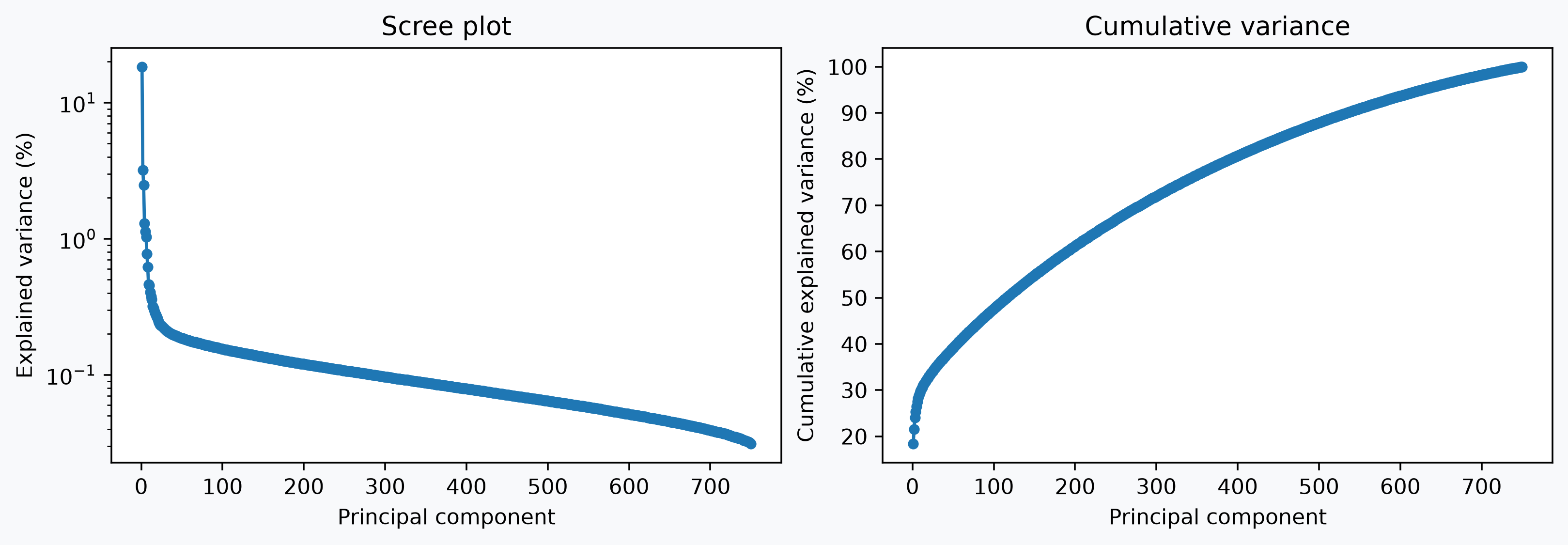
Explained variance
explained_variance_ratio_
gives the fraction of total variance captured along each selected principal axis. For
centered data with shape (time, space), the rank is at most min(space, time - 1),
so a final near-zero entry appears in the spectrum; we omit it here for clarity. The
scree plot on the left highlights the rapid decay of successive components, while the
cumulative curve on the right shows how quickly the total explained variance saturates.
These plots can help guide the choice of how many components to retain for further
analysis, for example by selecting the "elbow" of the screen plot or a threshold for
cumulative variance.
variance_ratio = pca_t.explained_variance_ratio_.isel(component=slice(None, -1))
component_ids = variance_ratio.component.values + 1
cumulative_variance = np.cumsum(variance_ratio.values) * 100

fig, axes = plt.subplots(1, 2, figsize=(10, 3.4), constrained_layout=True)

axes[0].plot(
    component_ids, variance_ratio.values * 100, marker="o", ms=4, color="tab:blue"
)
axes[0].set_yscale("log")
axes[0].set_xlabel("Principal component")
axes[0].set_ylabel("Explained variance (%)")
axes[0].set_title("Scree plot")

axes[1].plot(component_ids, cumulative_variance, marker="o", ms=4, color="tab:blue")
axes[1].set_xlabel("Principal component")
axes[1].set_ylabel("Cumulative explained variance (%)")
_ = axes[1].set_title("Cumulative variance")
Temporal PCA maps and corresponding time courses
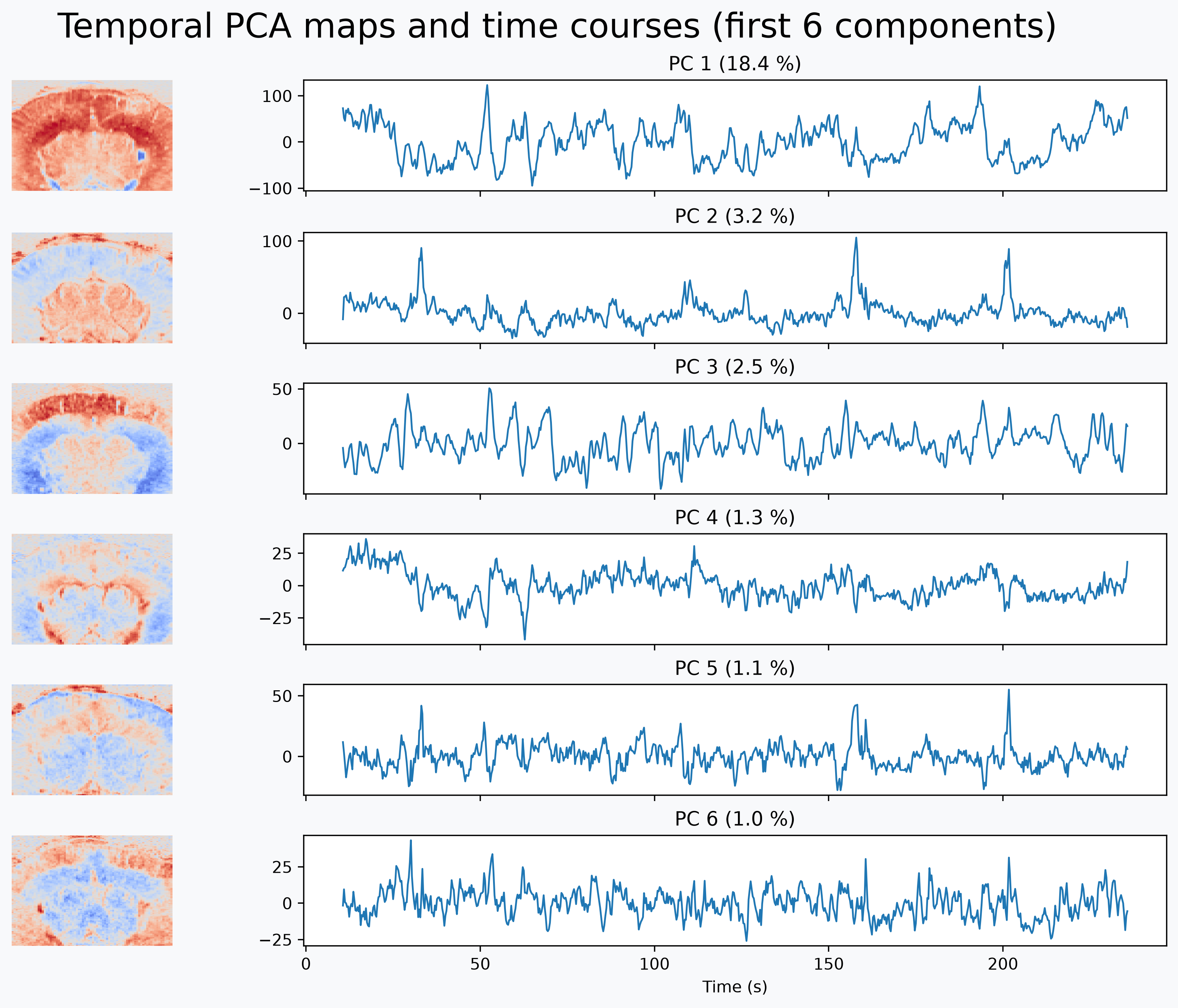
maps_ stores principal axes in voxel space as a
(component, k, j, i) DataArray. transform
returned the associated temporal scores in signals_t, a (time, component)
DataArray.
Looking at both together is more informative than either alone. The maps show the dominant covariance structure in space, while the scores show how strongly each pattern is expressed over time.
n_show = 6
fig = plt.figure(figsize=(10.5, 8.5), constrained_layout=True)
fig.patch.set_facecolor(bg_color)
gs = fig.add_gridspec(n_show, 2, width_ratios=[1, 3])

axes_tc = [fig.add_subplot(gs[i, 1]) for i in range(n_show)]
for ax in axes_tc[1:]:
    ax.sharex(axes_tc[0])

for i, comp in enumerate(range(n_show)):
    var = float(pca_t.explained_variance_ratio_.sel(component=comp)) * 100

    component_map = pca_t.maps_.isel(component=[comp])
    cf.plotting.plot_stat_map(
        component_map,
        axes=fig.add_subplot(gs[i, 0]),
        slice_mode="component",
        show_axes=False,
        show_colorbar=False,
        show_titles=False,
        bg_color=bg_color,
    )

    signals_t.sel(component=comp).plot(ax=axes_tc[i], lw=1.1)
    axes_tc[i].set_title(f"PC {comp + 1} ({var:.1f} %)")
    axes_tc[i].set_xlabel("")
    axes_tc[i].set_ylabel("")

for ax in axes_tc[:-1]:
    ax.tick_params(labelbottom=False)
axes_tc[-1].set_xlabel("Time (s)")
_ = fig.suptitle("Temporal PCA maps and time courses (first 6 components)", fontsize=21)
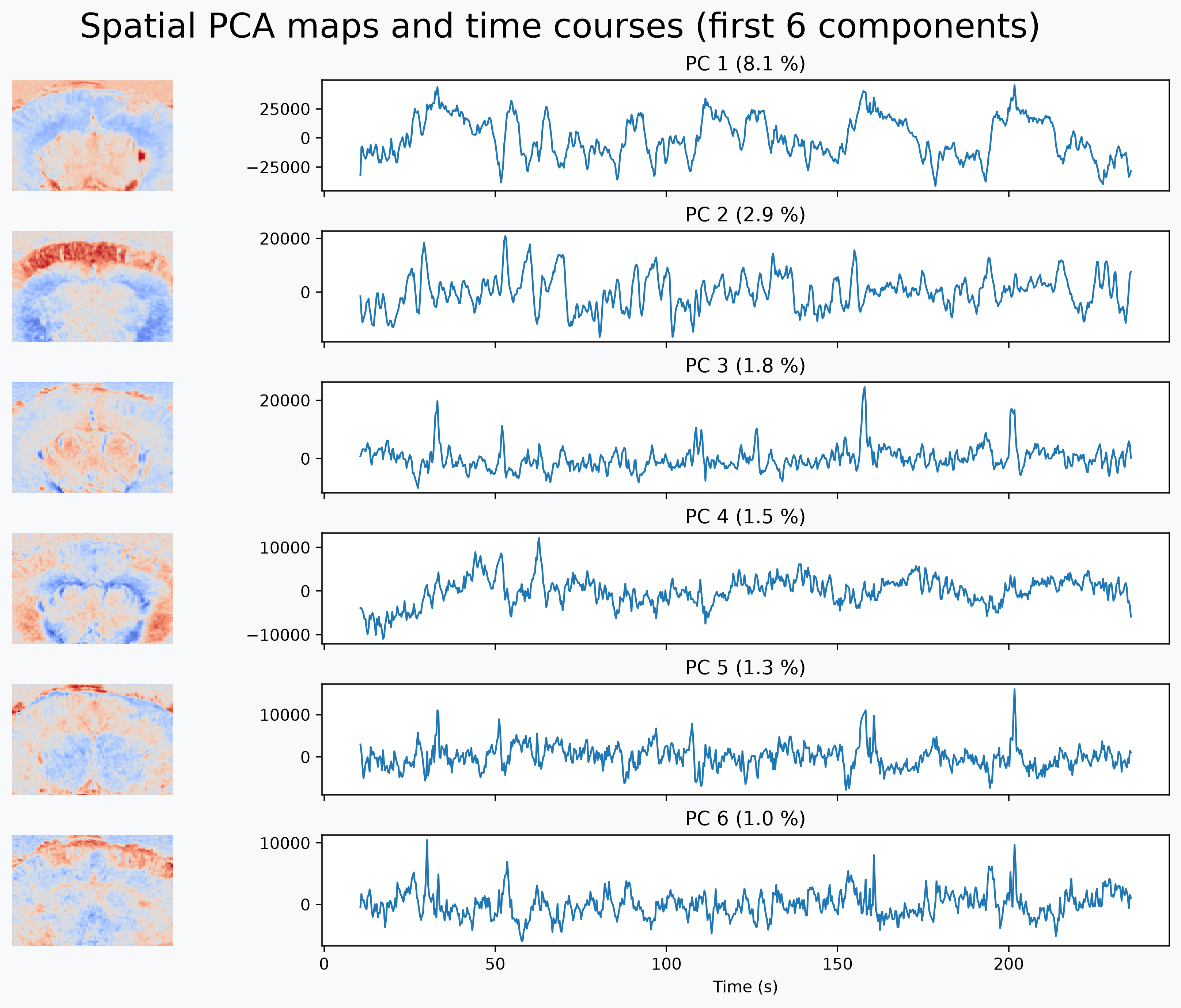
Spatial PCA (mode="spatial")
Spatial PCA transposes the matrix to (space, time) before decomposition. In this
orientation, variance maximization is performed across voxels, yielding orthogonal
spatial maps as principal components.
pca_s = cf.decomposition.PCA(random_state=0, mode="spatial")
signals_s = pca_s.fit_transform(data_std)
signals_s
- time: 751
- component: 751
- -3.187e+04 -1.548e+03 883.6 -3.861e+03 ... 1.222 39.7 15.21 -0.0009351
array([[-3.18660137e+04, -1.54776685e+03, 8.83627747e+02, ..., -4.14212151e+01, -7.76363373e+01, -7.46693288e-04], [-7.83757812e+03, -7.99474463e+03, 1.94659033e+03, ..., -3.73594131e+01, 1.92134819e+01, -8.50242039e-04], [-7.64179932e+03, -1.13111875e+04, 3.10128125e+03, ..., 7.67992020e+00, 5.17666149e+00, -9.07336478e-04], ..., [-3.34484570e+04, 1.15906836e+03, 5.94009717e+03, ..., -5.00937042e+01, -3.77178717e+00, -1.44857180e-03], [-3.14558066e+04, 6.79484033e+03, 4.77665283e+03, ..., 4.78399200e+01, 2.48789673e+01, -7.70006678e-04], [-2.85970098e+04, 7.54298926e+03, 2.42949936e+02, ..., 3.97029877e+01, 1.52076645e+01, -9.35096759e-04]], shape=(751, 751), dtype=float32) - time(time)float6410.61 10.91 11.21 ... 235.4 235.7
- units :
- s
- volume_acquisition_reference :
- start
- volume_acquisition_duration :
- 0.3
array([ 10.608, 10.908, 11.208, ..., 235.095, 235.395, 235.695], shape=(751,))
- component(component)int640 1 2 3 4 5 ... 746 747 748 749 750
array([ 0, 1, 2, ..., 748, 749, 750], shape=(751,))
- long_name :
- PCA signals
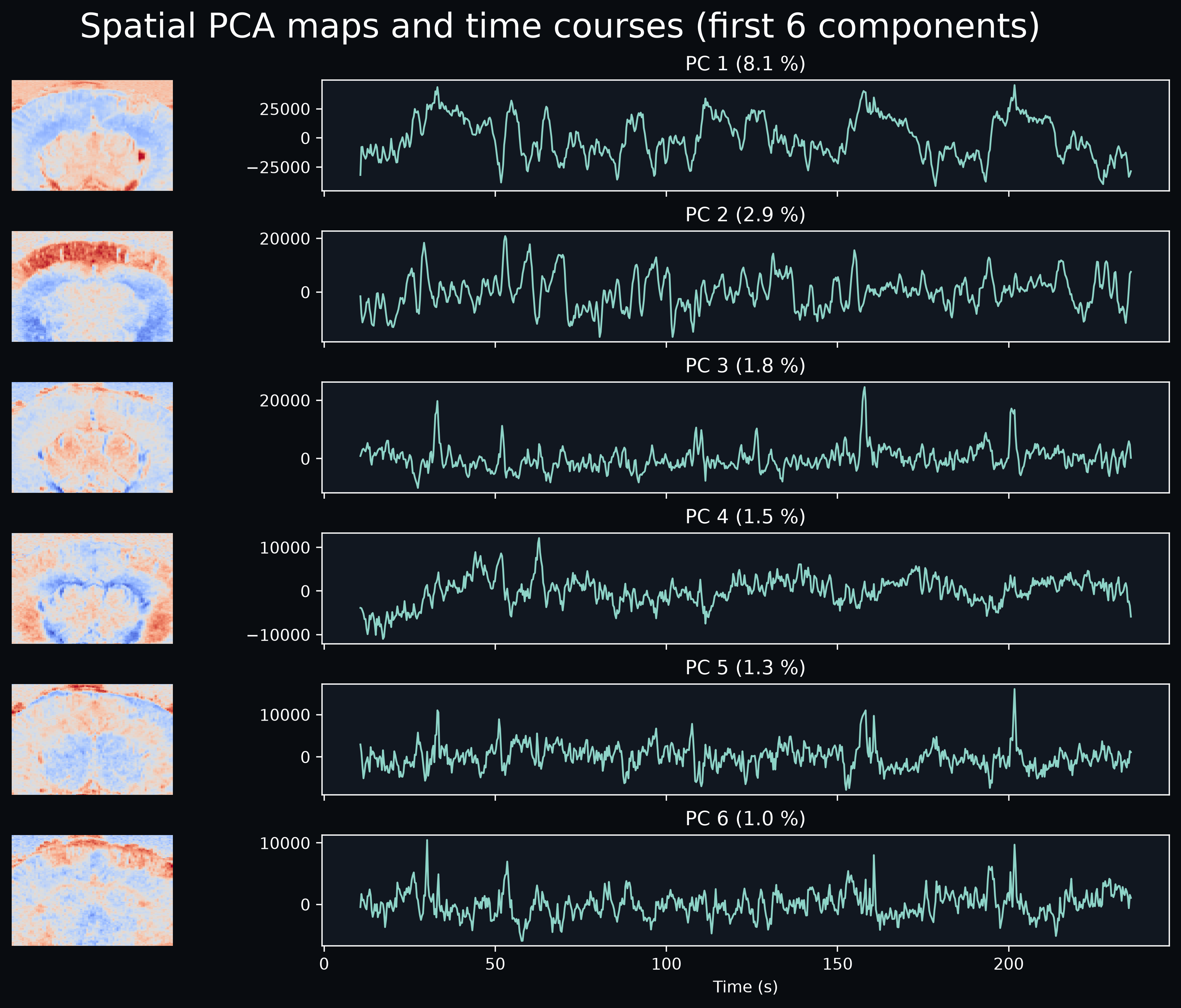
As in temporal mode, we inspect maps and corresponding time courses jointly.
n_show = 6
fig = plt.figure(figsize=(10.5, 8.5), constrained_layout=True)
fig.patch.set_facecolor(bg_color)
gs = fig.add_gridspec(n_show, 2, width_ratios=[1, 3])

axes_tc = [fig.add_subplot(gs[i, 1]) for i in range(n_show)]
for ax in axes_tc[1:]:
    ax.sharex(axes_tc[0])

for i, comp in enumerate(range(n_show)):
    var = float(pca_s.explained_variance_ratio_.sel(component=comp)) * 100

    component_map = pca_s.maps_.isel(component=[comp])
    vmax = float(np.abs(component_map).max())
    cf.plotting.plot_stat_map(
        component_map,
        axes=fig.add_subplot(gs[i, 0]),
        slice_mode="component",
        cmap="coolwarm",
        vmax=vmax,
        show_axes=False,
        show_colorbar=False,
        show_titles=False,
        bg_color=bg_color,
    )

    signals_s.sel(component=comp).plot(ax=axes_tc[i], lw=1.1)
    axes_tc[i].set_title(f"PC {comp + 1} ({var:.1f} %)")
    axes_tc[i].set_xlabel("")
    axes_tc[i].set_ylabel("")

for ax in axes_tc[:-1]:
    ax.tick_params(labelbottom=False)
axes_tc[-1].set_xlabel("Time (s)")
_ = fig.suptitle("Spatial PCA maps and time courses (first 6 components)", fontsize=21)
Total running time: 275.9 s
Launch in Binder Download .py Download .ipynb
-
We usually consider voxels as features and time points as samples, but PCA can be applied in either orientation. ↩